

Part 03
Producers
Who grows on each plot, and the country that decides how its evidence is read.
The producer list
Plots and producers › Producers
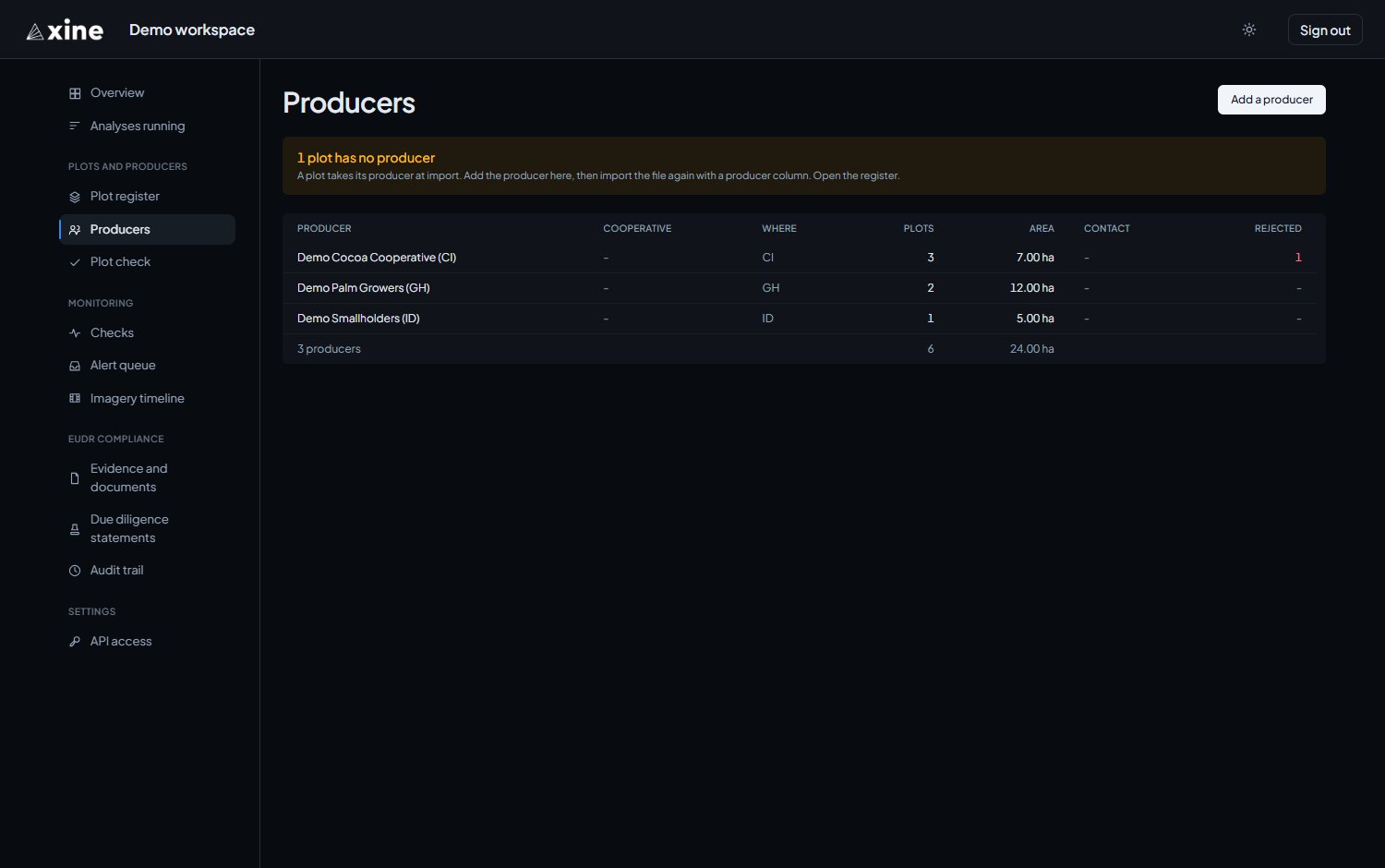
Your producers, sorted with those holding rejected plots first. Each row shows the producer, the cooperative, where they grow, their plots, the area those plots cover, the contact, and how many of their plots would be rejected. Clicking a plot count opens the Plot register filtered to that producer.
An amber banner above the list counts the plots in your register that have no producer against them.
Adding a producer
Producers › Add a producer
The form takes six fields. Only the name is required to save.
| Field | What to enter |
|---|---|
| Name | The name your plot files carry in their producer column, so the import can match it. |
| Your reference | Your own identifier for the producer. |
| Cooperative | The cooperative the producer belongs to, if any. |
| Country (ISO-2) | The two-letter code of the country where the crop is grown, such as CI or GH. |
| Contact | A contact name. |
| A contact email. |
Why the country matters
The country is where the crop is grown. It does two jobs:
- it decides which control campaign a plot's evidence is read against, which the evidence document reports under How this measurement was tested;
- a due diligence statement needs one for every producer.
The portal has no edit form for a producer, and it attaches producers to plots only at import. Create every producer, with a country, before you import the plots that name them.