

Start here
The EUDR workflow in the portal: your plot register, the evidence behind each plot, and the statements you file. Guides for the other lanes, including the field register for agriculture, follow.
The Lisaris client portal is where you keep your plot register, check each
boundary against the geometry rules TRACES enforces, read the pre-cutoff
land-use evidence for each plot, assemble due diligence statements for you
to file, and work any cases raised on areas we watch for you. Sign in at
lisaris.axinelabs.com.
If you are new
Read A first batch in ten minutes and do it with a small file of your own. It takes you from an empty register to a downloaded evidence document, and it introduces the three things every other page assumes: a plot's reference, its producer's country, and its verdict.
Controls are named here exactly as they appear on screen, so the search in your browser will find one by its on-screen name.
Finding your way round
The header shows your workspace name and any active engagement. If your account belongs to more than one workspace, Switch workspace moves between them.
The sidebar groups the pages under Plots and producers, Monitoring, EUDR compliance and Settings, with Overview and Analyses running above them. It is hidden when the browser window is narrow, so widen the window if you cannot see it.
Overview
Overview
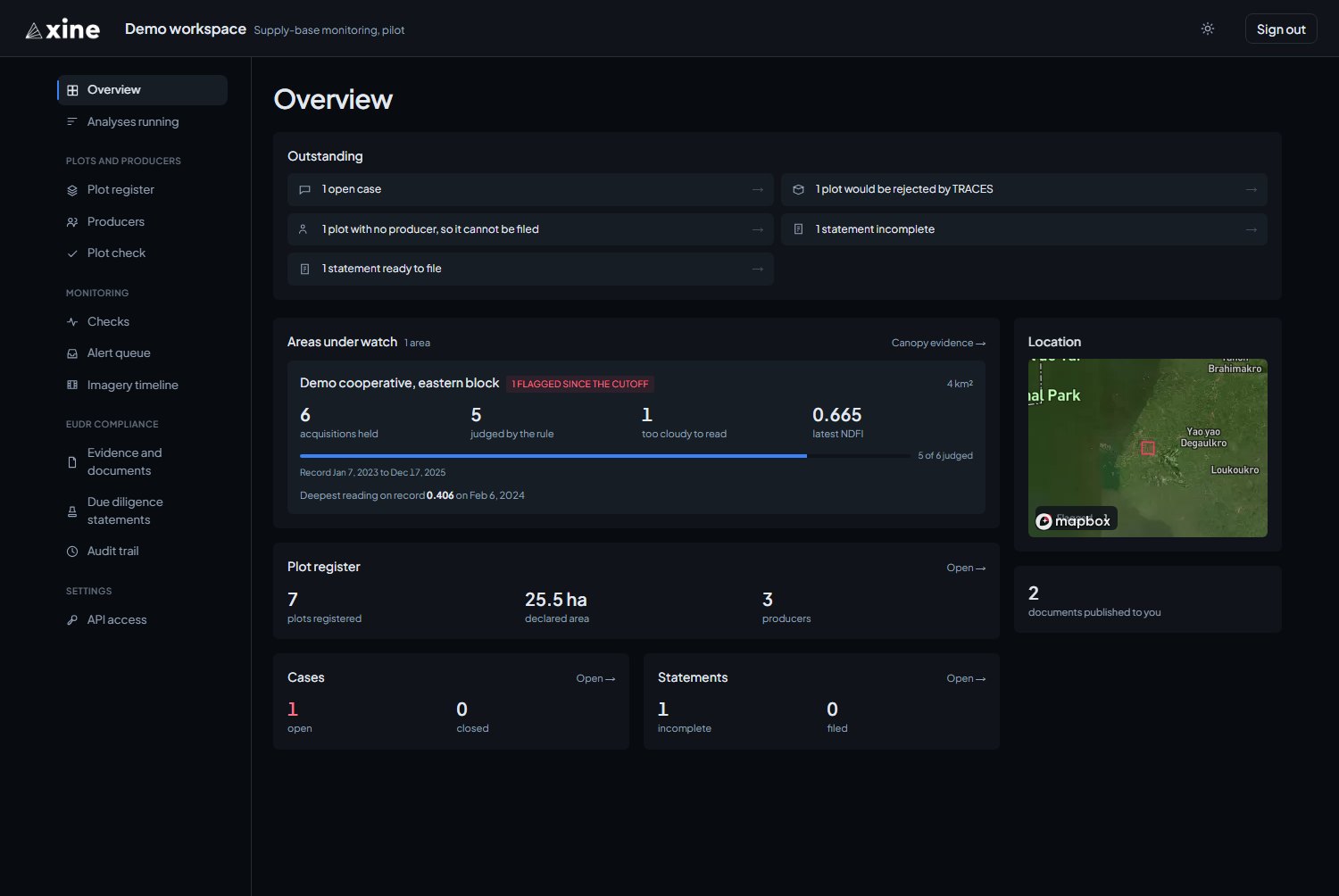
Outstanding lists what needs doing, each item linking to the page that clears it: open cases, plots TRACES would reject, plots with no producer, statements incomplete or ready to file, and watched areas with thin coverage. When the list is empty it reads Nothing outstanding. Below it are the areas under watch, counts for your register, cases and statements, a location map, and the number of documents published to you.
Analyses running
Analyses running
Lists the analyses the Axine team is producing for your engagement, with the status and stage of each, and refreshes itself. It is empty unless one is in progress.
The parts
A first batch in ten minutes
Producers, import, validation, evidence and the PDF.
PART 02Plot register and Plot check
The register, the plot page, and the dry-run check.
PART 03Producers
Adding producers, and why the country matters.
PART 04Reading an evidence document
The finding, the instruments, the record and the testing.
PART 05Due diligence statements
Assembling, completing, downloading and recording a filing.
PART 06Cases
How a case opens, working it, and exporting its record.
PART 07The evidence pack and share links
The evidence pack, creating and revoking a share link, and what the recipient sees.
PART 08Areas we watch for you
Checks, cases, the imagery timeline, deliverables and the audit trail.
PART 09API access
Creating, copying and revoking keys.
PART 10Reference
Verdicts, reason codes and the ground the evidence reads best.
Conventions
- Controls are named as they appear on screen: Import plots, Run evidence on filable plots, Assemble.
- A line such as
Plots and producers › Plot registeris a location in the sidebar, read left to right. - Values in
monospaceare what the product or the API itself prints: column names, verdicts and reason codes. - Labels in italics are statuses and verdicts as the register shows them, such as Filable or Withheld.
The plot register, producers, Plot check, statements and API access work from the moment you sign in. Checks, the alert queue, the imagery timeline and evidence and documents fill once the Axine team watches an area for you or publishes a result to you. Part eight covers them.
Other lanes
This guide covers the EUDR workflow. Two other guides cover the other lanes the portal reaches, for the workspaces that hold them: